ArchivesSpace Agent and Subject Records: Best Practices
Created by YAMS ArchivesSpace Agents and Subjects Task Force, February 2017; revised September 2017, February 2019, and March 2022
Introduction
Resource and Catalog Records Requirements
Identifying Existing Agent and Subject Records
Importing Records into ArchivesSpace
Import LCNAF and LCSH records using the ArchivesSpace import plugin
Edit imported agent records
Edit imported subject records
Merging Records
Editing Records
Creating New Agent Records
Creating New Subject Records
Introduction
These best practices were developed in 2017 by the ArchivesSpace Agents and Subjects Task Force, a subgroup of the Yale Archival Management Systems Committee charged with establishing cross-repository control of names and subjects in Yale’s ArchivesSpace database. This document was revised in 2019 February, with revised instructions for creating new records, and new instructions for identifying existing records, importing LCNAF and LCSH authority records, and merging duplicate records.
During 2017-2018, the agent and subject records created before the 2017 July implementation of these best practices were revised, after which the ArchivesSpace Agents and Subjects Task Force identified and merged or deleted circa 55,000 duplicate records. Most of this revision and merging was done via batch processing; remaining duplicate records may be identified and merged as needed by YUL staff, according to procedures outlined below. These procedures assume familiarity with ArchivesSpace resource editing and linking, and with your repository’s local practice. For more guidance, consult with your supervisor.
This document is maintained by Yale Archival Management Systems Committee (YAMS). Please direct comments to the current chair(s) of YAMS.
Resource and Catalog Records Requirements
Resource records for finding aids and their associated collection-level catalog records must meet the following requirements:
Each resource record in ArchivesSpace must have a corresponding collection-level record in Voyager. The following elements are required for cross-referencing resource records and catalog records:
In Voyager (035 ‡9 field) enter the ArchivesSpace EAD ID, in this format: (YUL)ead.[repository id].[ead id]
Examples: 035 ‡9 (YUL)ead.beinecke.livingston 035 ‡9 (YUL)ead.divinity.196In ArchivesSpace (end of Basic Information section) enter the Voyager Bib ID. The Bib ID may be copied from an 035 field added during Backstage authority processing.
Only create agent and subject records that you will link to finding aids. Finding aid resources must include links to all agent and subject records corresponding to the following:
Collection-level catalog records: all 1xx, 6xx, and 7xx fields
Other levels of description: follow your repository’s local practice
For general instructions on linking agent and subject records to finding aids, see the Linking Records section in the ArchivesSpace at Yale: User Manual.
Identifying Existing Agent and Subject Records
Search for records already in ArchivesSpace and prefer authority records displaying the following sources:
Agents: LCNAF (identifiable by an URI in Authority ID field: id.loc.gov)
Subject, topical, geographic, or occupation: LCSH (identifiable by an URI in Authority ID field: id.loc.gov)
Subject, genre: AAT (identifiable by an URI in Authority ID field: vocab.getty.edu/aat/) Merge any duplicate local records in ArchivesSpace into the preferred authority record.
If no authority record is found in ArchivesSpace but one exists in LC, AAT, or another source, search and import a new record into ArchivesSpace:
Agents: search and import, using the LC import plugin
Subjects, topical, geographic, or occupation: search and import, using the LC import plugin
Subjects, genre: search AAT website and create new record manually
If no LC or AAT authority is found, optionally, in accordance with your repository’s local practice, search instead Union List of Artist Names or other authority databases and manually create a new agent record or new subject record
Merge any duplicate local records in ArchivesSpace into the imported or manually-created authority record.
If no authority record is found in any source, determine if a local record exists in ArchivesSpace:
Verify personal and corporate identities:
Review usage in existing finding aids in Archives at Yale.
Consult staff at other YUL repositories as needed
If no authority record or local ArchivesSpace record is found, manually create a new agent record or new subject record.
Importing Records into ArchivesSpace
Import LCNAF and LCSH records using the ArchivesSpace import plugin
In ArchivesSpace, click on the gear icon next to repository code on upper right
Click on Plugins
Choose LCNAF import
Choose either LCNAF or LCSH button. For names with both LCNAF and LCSH forms, note the following:
Corporate names: use LCNAF Example: United Nations (name authority record identifier: http://id.loc.gov/authorities/names/n79021345)
Family names: use LCSH Example: Pease family (subject authority record URI: http://id.loc.gov/authorities/subjects/sh85099077)
Enter search terms
Search personal names in this form: [last name], [first name]
If a record is found, click Select
Click Import
After redirect to jobs page, wait until job has completed
Click Refresh page
Scroll to “New & Modified Records” and open record
Click Edit, and edit fields as shown below
Edit imported agent records
Authority ID field: change the imported authority record identifier to a LC linked data URI by preceding the identifier with: http://id.loc.gov/authorities/names/ Example:
Imported authority record identifier: n85286106
Authority ID field: http://id.loc.gov/authorities/names/n85286106
If information is imported into the Dates of Existence fields, edit the following:
Begin and End fields verify or edit so that dates are in standard form: YYYY, YYYY-MM, or YYYY-MM-DD
After entering dates in standard form in Begin and End fields, delete Expression field
For name/title records, edit title in Qualifier field:
Delete subfield labels supplied by ASpace
Verify subfields and subfield order in conformance with LCNAF
Enter subfield delimiters, in this format: $[x]:
Delete extra periods at ends of subfields Example: LCNAF: ‡a Brahms, Johannes, ‡d 1833-1897. ‡t Gesänge, ‡n op. 72. ‡p: Alte Liebe Qualifier field, as imported: Number of part/section of a work: op. 72.. Name of a part/section of a work: Alte Liebe. Title of work: Gesänge,. Qualifier field, edited: $t: Gesänge, $n: op. 72. $p: Alte Liebe
Edit imported subject records
Authority ID field: change the imported authority record identifier to a LC linked data URI by preceding the identifier with: http://id.loc.gov/authorities/subjects/ Example:
Imported authority record identifier: sh85099077
LC linked data URI Authority ID field: http://id.loc.gov/authorities/subjects/sh85004336
Optionally, if there is potentially outdated or harmful language used in the subject record scope note, consult with the Reparative Archival Description Working Group (RAD) by contacting its chair. RAD will work with you to potentially identify a local revision to the scope note. Once that has been determined, RAD will follow these steps:
Edit the scope note to reflect locally-preferred language.
Add the following boilerplate text at the end of the scope note: This Library of Congress Subject Headings scope note was edited for local use in Archives at Yale by Yale University Library staff in [YEAR] to address outdated or harmful descriptive language. For more information, see the Yale Statement on Harmful Language in Archival Description: https://guides.library.yale.edu/specialcollections/statementondescription
Announce and document the change by:
Recording it in AMDECO meeting minutes as an update
Logging it via a list on the RAD LibGuide (to be set up as RAD sees fit, or documented as the A&I AG suggests)
Merging Records
To merge duplicates into a preferred authority or local record:
In ArchivesSpace, open the preferred record
Click Merge (located to the left of the red Delete box)
Click the down arrow to the right of the search box and choose Browse
Search for name to merge into the preferred record
Select the correct record by checking the box to the the left of the name, and click Link to Agents
Do not select for merging any names followed by work titles or other subfields (i.e., $v Portraits)
Click Merge button (below selection) and Merge again (in pop-up box)
After merging, resources linked to both records are now all linked to the preferred record. Please note that when merging an agent record into another agent record, if the agent record that will be merged has any associated notes or contact details, that data will NOT be added to the record into which the agent is being merged. Please be sure to copy any existing notes or contact details that should be retained prior to performing a merge.
Editing Records
Optionally, update local agent records:
Verify that new information is for the same person
Add birth and death dates or make other name form changes
Add a brief Biography/Historical note, especially to distinguish from similar names. Optionally check Publish to display this field in Archives at Yale.
Optionally, if you identify potentially outdated or harmful language used in the subject record scope note, consult with the Reparative Archival Description Working Group (RAD) by contacting its chair. RAD will work with you to potentially identify a local revision to the scope note. Once that has been determined, RAD will follow these steps:
Edit the scope note to reflect locally-preferred language.
Add the following boilerplate text at the end of the scope note: This Library of Congress Subject Headings scope note was edited for local use in Archives at Yale by Yale University Library staff in [YEAR] to address outdated or harmful descriptive language. For more information, see the Yale Statement on Harmful Language in Archival Description: https://guides.library.yale.edu/specialcollections/statementondescription
Announce and document the change by:
Recording it in AMDECO meeting minutes as an update
Logging it via a list on the RAD LibGuide (to-be-set up as RAD sees fit, or documented as the A&I AG suggests)
If you wish to make an LCSH proposal for a revised subject heading, contact the Reparative Archival Description Working Group (RAD) chair. RAD which will bring the question to the Authorities and Identities Advisory Group for conversation and support. More information about the LCSH process is here: https://www.loc.gov/aba/publications/FreeSHM/H0400.pdf
General editing instructions:
Do not enter punctuation or parentheses at the end of subfields; all punctuation will be supplied by ArchivesSpace.
Be sure you do not leave any blank spaces at the end of the subfields or any other data field.
Fields in ArchivesSpace agent records map to MARC fields in Library of Congress Name Authority File (LCNAF) records as listed below.
Agent
Basic information
Dates of existence (personal)
Begin: 046 ‡f
End: 046 ‡g
Dates of existence (corporate)
Begin: 046 ‡s
End: 046 ‡t
Name Forms (personal)
Primary Part of Name: 100 ‡a (surname only)
Rest of Name, personal: 100 ‡a (forename or initials only)
Title, personal: 100 ‡c [includes name suffixes, such as Jr.]
Fuller Form, personal: 100 ‡q
Number, personal: 100 ‡b
Dates, personal: 100 ‡d
Qualifier: 100 ‡t and other subfields following ‡t
Name Forms (corporate)
Primary Part of Name, corporate: 110 ‡a
Subordinate Name, corporate: 110 ‡b
Subordinate Name, conference: 111 ‡e
Number, conference: 111 ‡n
Dates, conference: 111 ‡d
Qualifier, conference: 111 ‡c
Name forms (family)
Dates, family: 100 ‡d
Qualifier, family: 100 ‡c, ‡g
The following LCNAF subdivisions are not mapped to agent records. After linking the agent to a resource record, add these as terms via the Add Term/Subdivision button. Do not include ending punctuation or trailing spaces:
Free-floating subdivisions: ‡v and ‡x
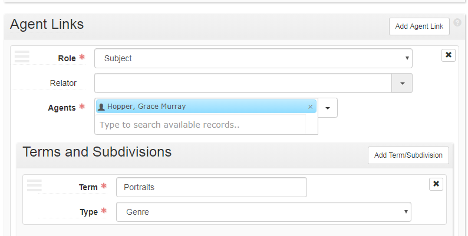
###Subject
Term
Topical: 150 ‡a
Occupation: 150 ‡a
Geographic: 151 ‡a
Preferred title: 130 ‡a through ‡t
Type
Topical: 150 ‡x
Geographic: 150 ‡z
Chronological: 150 ‡y
Genre: 150 ‡v
Creating New Agent Records
Manually create a new agent record only if no LCNAF authority record is available for import. Definitions of agent record fields in the instructions below reference corresponding MARC fields in LCNAF records.
The following instructions are for constructing an Agent record for a Person. Follow these same basic instructions for Family and Corporate Entity records–any variants specific to those types will appear below.
Click Create and choose the record types from the two dropdown menus
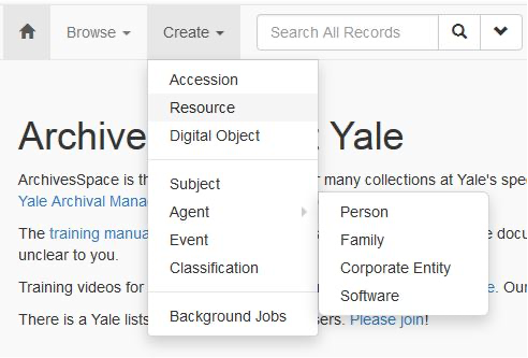
The New Person screen will appear with the following fields:
Basic Information
Publish: check box
Dates of Existence
Optional; use primarily if an authorized name lacks life dates. To add, click the Add Date box on right and a form will appear. For Type choose Range
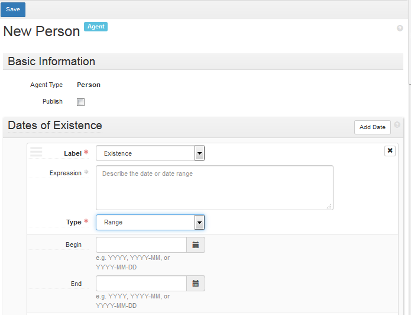
and enter dates (LCNAF 046 ‡f ‡g for personal names, or LCNAF 046 ‡s ‡t for family and corporate names) in fields Begin and/or End.
Name Forms
Required. Authority ID: required, if available from LC Linked Data Service; URI is found near the top of the entry
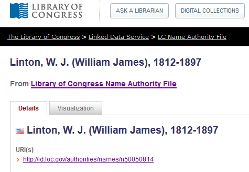
To find the URI for a ULAN record, click Semantic View on the left above the name
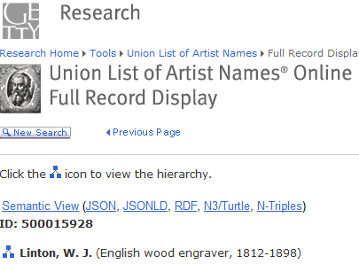
which opens another screen with the URI up at the top:
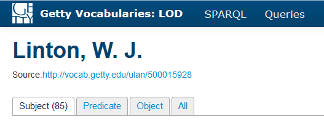
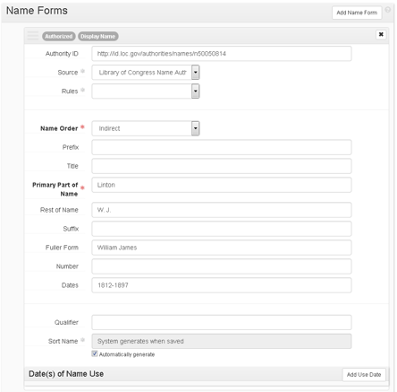
Source: required; choose Library of Congress Name Authority File, Union List of Artist Names, or appropriate local library code if not in either authorized source. Rules: choose Resource Description and Access if Source is a local library code; otherwise leave blank. Name Order: required; choose Indirect for Person unless the person has a single name (then choose Direct). Primary part of name: required. Use LCNAF 100 ‡a for family (surname) only Rest of Name: Use LCNAF 100 ‡a for forename or initials only
Required when applicable:
Title: LCNAF 100 ‡c [includes name suffixes, such as Jr.]
Fuller Form: LCNAF 100 ‡q
Number: LCNAF 100 ‡b
Dates: LCNAF 100 ‡d
Qualifier (for name/title): LCNAF 100 ‡t and other subfields following ‡t
All other Name Forms elements: leave blank. Do not include free-floating subdivisions (‡v, ‡x). After linking the agent to the resource, add these to the linked agent as terms/subdivisions in the resource record. See the Linking Records section in the ArchivesSpace at Yale: User Manual.
Sort name: check Automatically generate at end of field.
Example of Person with Library of Congress authorized record:
Contact Details
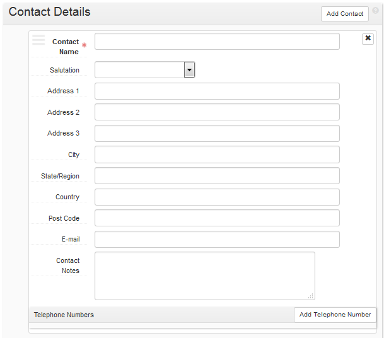
Please note that contact details are never displayed in the ArchivesSpace public user interface, even if the agent record is published.
Notes - Biographical/Historical
Consider adding a brief Biography/Historical note, especially to distinguish from similar names. Optionally check Publish for display in Archives at Yale.
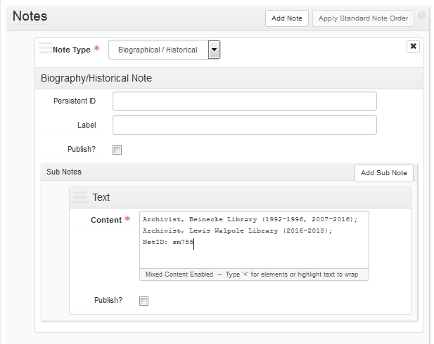
This note is required when creating an Agent record for a Yale staff member or student worker who will be adding or editing ArchivesSpace records. Add a Biography/Historical note with the person’s YUL affiliation, including dates of service if known, followed by a semicolon and the person’s NetID. Do not check Publish.
Example of YUL Staff Person:
Other fields
Generally, do not use.
For Family agent records
Name Forms
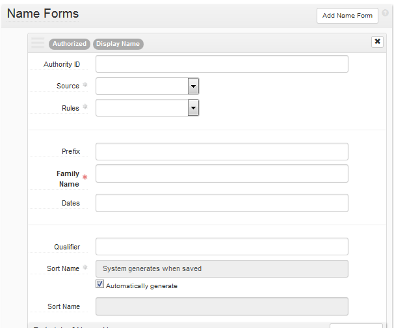
Required name element: Family Name: LCNAF 100 ‡a Required when applicable:
Dates: LCNAF 100 ‡d
Qualifier: LCNAF 100 ‡c, ‡g
For Corporate Entity agent records
Name Forms
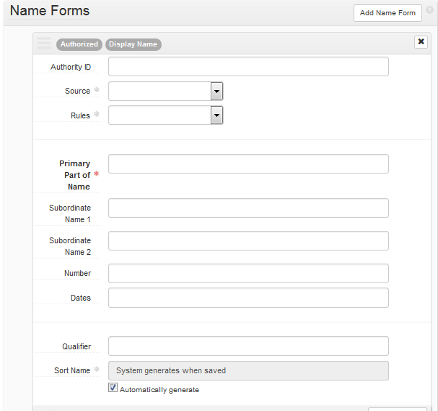
Required name element: Primary Part of Name: LCNAF 110 ‡a Required when applicable: Subordinate Name 1 and 2: LCNAF 110 ‡b
All other name elements: blank
For Corporate Entity (conference) agent records
Name forms
Required name elements: Primary Part of Name: LCNAF 111 ‡a Required when applicable:
Subordinate Name 1 and 2: LCNAF 111 ‡e
Number: LCNAF 111 ‡n
Dates: LCNAF 111 ‡d
Qualifier: LCNAF 111 ‡c
All other name elements: blank
Creating New Subject Records
Manually create a new subject record only if no LCSH or AAT authority record is available for import/entry. Definitions of subject record fields in the instructions below reference corresponding MARC fields in LCSH records.
The following instructions are for constructing a Subject record for a Topical subject. Follow these same basic instructions for Occupation, Geographic, Preferred Title, and Genre records–any variants specific to those types will appear below.
Click Create and choose Subject.
Basic information
Required: use default fields shown
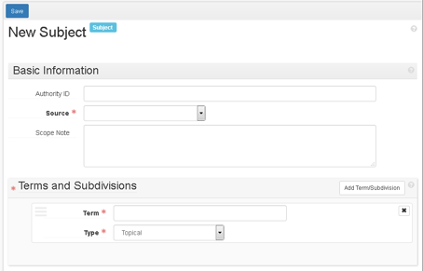
Authority ID: optional. If available, use a URI from LC Linked Data Service or Art & Architecture Thesaurus. Source: required. Choose Library of Congress Subject Headings, another thesaurus code, or appropriate Yale Library local code (at the end of the list) from the drop-down menu.
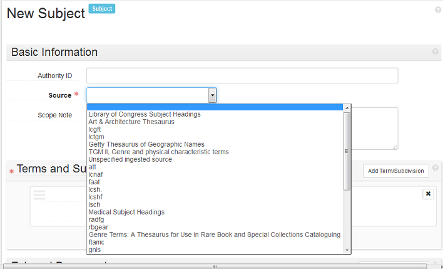
For LCSH subjects with subdivisions:
If the subdivisions are free-floating, code the record as local, using the appropriate code
If the entire heading, with subdivisions, has an authority record, record the LC linked data URI for the entire heading in the Authority ID field (Example: Carrots ‡x Diseases and Pests).
Terms and Subdivisions
Term: required: LCSH 150 ‡a, or local term Type: required: use default, Topical
Add Term/Subdivision: optional and repeatable Term: LCSH 150 ‡x, ‡z, ‡y, ‡v, or local term Type: use one of the following:
LCSH 150 ‡x: Topical
LCSH 150 ‡z: Geographic
LCSH 150 ‡y: Chronological
LCSH 150 ‡v: Genre
Other fields
Generally, do not use External Documents.
Create new subject: Occupation
Terms and Subdivisions
Term: required: LCSH 150 ‡a, or local term Type: required: choose Occupation
Add Term/Subdivision: optional and repeatable Term: LCSH 150 ‡y, ‡z, or local term Type: choose Geographic or Chronological
Create new subject: Geographic
Terms and Subdivisions
Term: required: LCSH 151 ‡a, or local term Type: required: choose Geographic
Add Term/Subdivision: optional and repeatable Term: LCSH 151 ‡v, ‡x, ‡y, ‡z, or local term Type: choose Genre, Topical, Geographic,or Chronological
Create new subject: Preferred title
Terms and Subdivisions
Term: required: LCSH 130 ‡a through ‡t, or local term Type: required: choose Preferred title
Add Term/Subdivision: optional and repeatable Term: LCSH 130 ‡v through ‡z, or local term Type: choose Genre, Topical, Geographic, or Chronological
Create new subject: Genre
Terms and subdivisions
Term: required: choose term from AAT or other thesaurus, or local term Type: required: choose Genre
Add Term/Subdivision: optional and repeatable Term: local term Type: choose appropriate term